App Share: RawHTTP (and a bonus)
There's a lot happening in the background when you make a connection request.
No time to spare, take me to the TL;DR!
Table of Contents
The Cost of a Click
Links are easy bait. One click, and you've typed your credentials into a Gmail lookalike. That's phishing. Another click, and you're redirected away from YouTube to the product page of the thing the YouTuber was reviewing. That's affiliate marketing.
In either case, you unknowingly divulged sensitive information. In the phishing scenario, your login credentials are now in the hands of an attacker who will cause you trouble. In the affiliate marketing scenario, the shortened link you clicked harvested a staggering amount of information— your device type, location, IP address, browser, language settings, where you found the link, which marketing campaign you were following, and much more— and shared it with the product manufacturer and others.
Even links which purport to reveal the destination URL aren't necessarily trustworthy. Take, for instance, the email below I received from Sony about my data request. See that link to their Privacy Policy at the very bottom of the email?
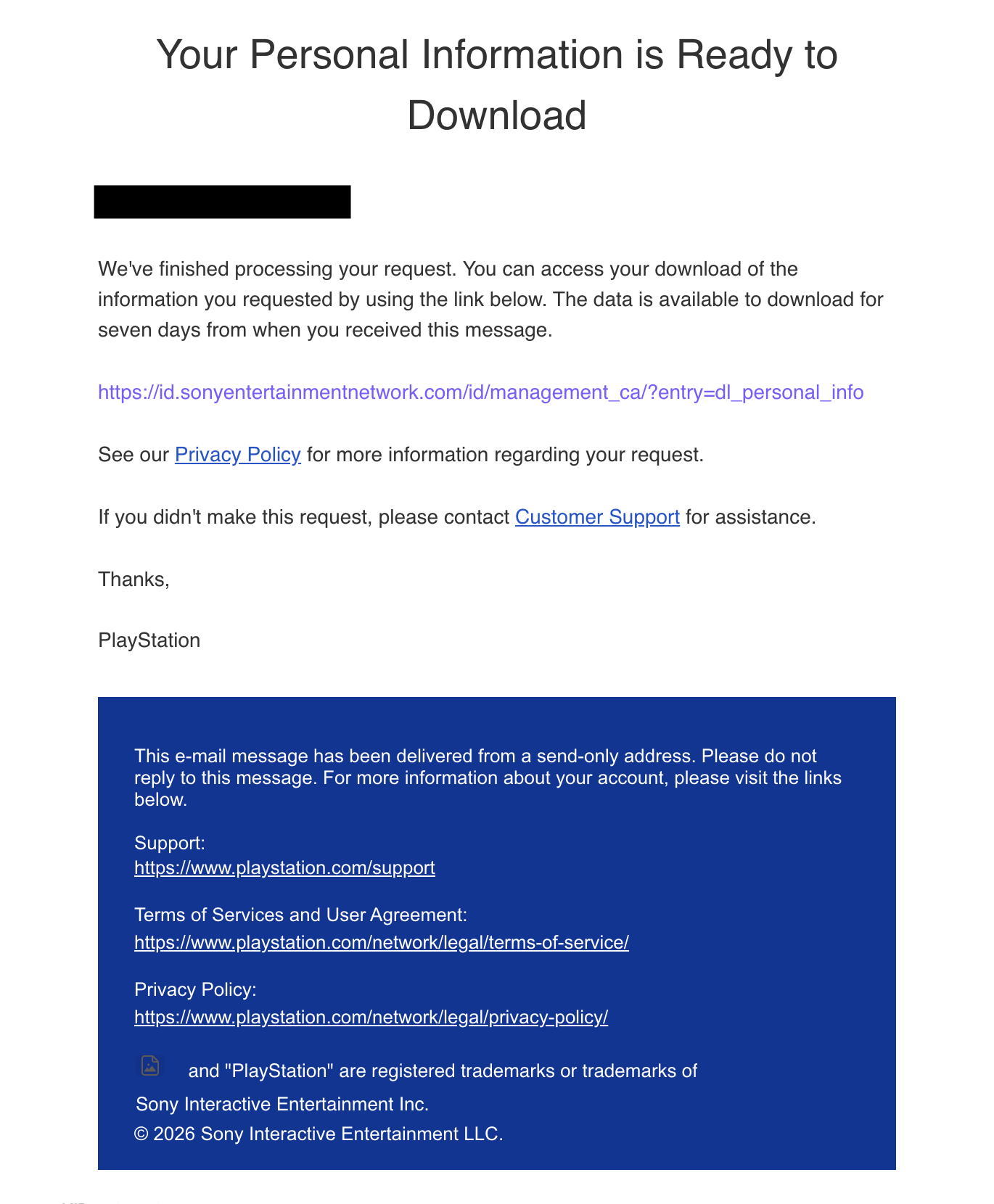
The URL says...
https://www.playstation.com/network/legal/privacy-policy/
But the actual hyperlink reference instead points to...
https://click.txn-email03.playstation.com/?qs=ABB7InY....uqICq-FSfnn0r4
This practice is known as link cloaking, or domain masking. It's a sneaky move, and makes me scratch my head as to why we refer to fraudulent websites prompting us for legitimate credentials as phishing, but chalk domain masking up to marketing. But I digress...
These issues (and others) have led me to rely on a tool called RawHTTP. The value proposition here is simple: instead of risking your own machine or data, the tool opens the link on a remote server, then fetches some data to reveal more about the URL in question, all without storing your search or collecting data about you. Let's take a look at how this works with a real example.
Finding the diamond in the rough
Using addy.io, I created an alias email to sign up for a coupon from SLNT (not a plug, I just like them and know they offer email discounts). A few minutes later, I received an email with a big, black button: Save Up To 30%. In Tuta Mail's desktop app, if you hover over a link, a grey bar at the bottom of the application reveals the hyperlink reference. In this case, it was:
https://ctrk.klclick.com/l/01M1W6NTCDXK0CG0BB4MGF5DC9_2
What the heck is ctrk.klclick.com? A quick search online (and a look at the email headers) reveals the domain belongs to Klaviyo, a marketing company that handles omnichannel marketing, including email tracking. Obviously, SLNT is leveraging the platform to track customers and gauge ad performance. However, we may not always have the time to research a domain, and even if we did, it's possible we wouldn't find any third-party information.
Enter RawHTTP. Instead of clicking the link ourselves, the tool does it for us— fetching and extracting the destination URL without us ever touching the bloated Klaviyo tracking link.
I should note: even though we don't touch the link, RawHTTP's server will. So, Klaviyo/SLNT will still know that the unique link embedded in your email was opened. What they are unlikely to learn are some extra tracking parameters, or be able to successfully fingerprint your device (if their method relies on you traversing the Klaviyo redirect first). For the aforementioned reason, you shouldn't input one-time links into RawHTTP unless you accept that they will be used up.
And, hey, look at that... the link we really care about is...
https://slnt.com/collections/sale?utm_source=AG%20%7C%20Welcome%20Series%20%
28Labor%20Day%29&utm_medium=AG%20%7C%20Welcome%20Series%20%28Labor%20Day%29&utm_campaign=Email%20%231%3A%20Welcome%20%5BUp%20to%2030%25%20Version%5D%20%28Y58uqy%29&utm_id=SFQPT7&triplesource=klaviyo&_kx=Dg5k7CJM5VCZs3m7sOKjixm2M-YOBQAO9djrJpUFrh8.JxwMTe
Well... kind of. There's actually quite a bit we could strip out that's tracking us, but I get into that later.
If that's all you need— a link unshortener/redirect-checker— then congrats, you're done! But, if you're curious about what else is happening at that link, RawHTTP is chock-full of features that can shed light on that, too.
And, bonus... it has a handful of other nifty tools you might find yourself using.
And, extra bonus... there's some upcoming features currently in beta to be excited about.
AND, super extra special bonus... there's a side project called RawPhish that even grandma can use and understand.
So... if all that piques your interest, keep reading. If you want to follow along, you can paste the link above into RawHTTP, or just peek at the screenshots I've added.
Ready? Let's get into it.
A deeper, technical dive
RawHTTP presents its findings in a neatly organized array. On the right is an image preview of the rendered site, top to bottom. Clicking the image opens a new tab with the full-size screenshot for closer inspection.
What's in a (domain) name?
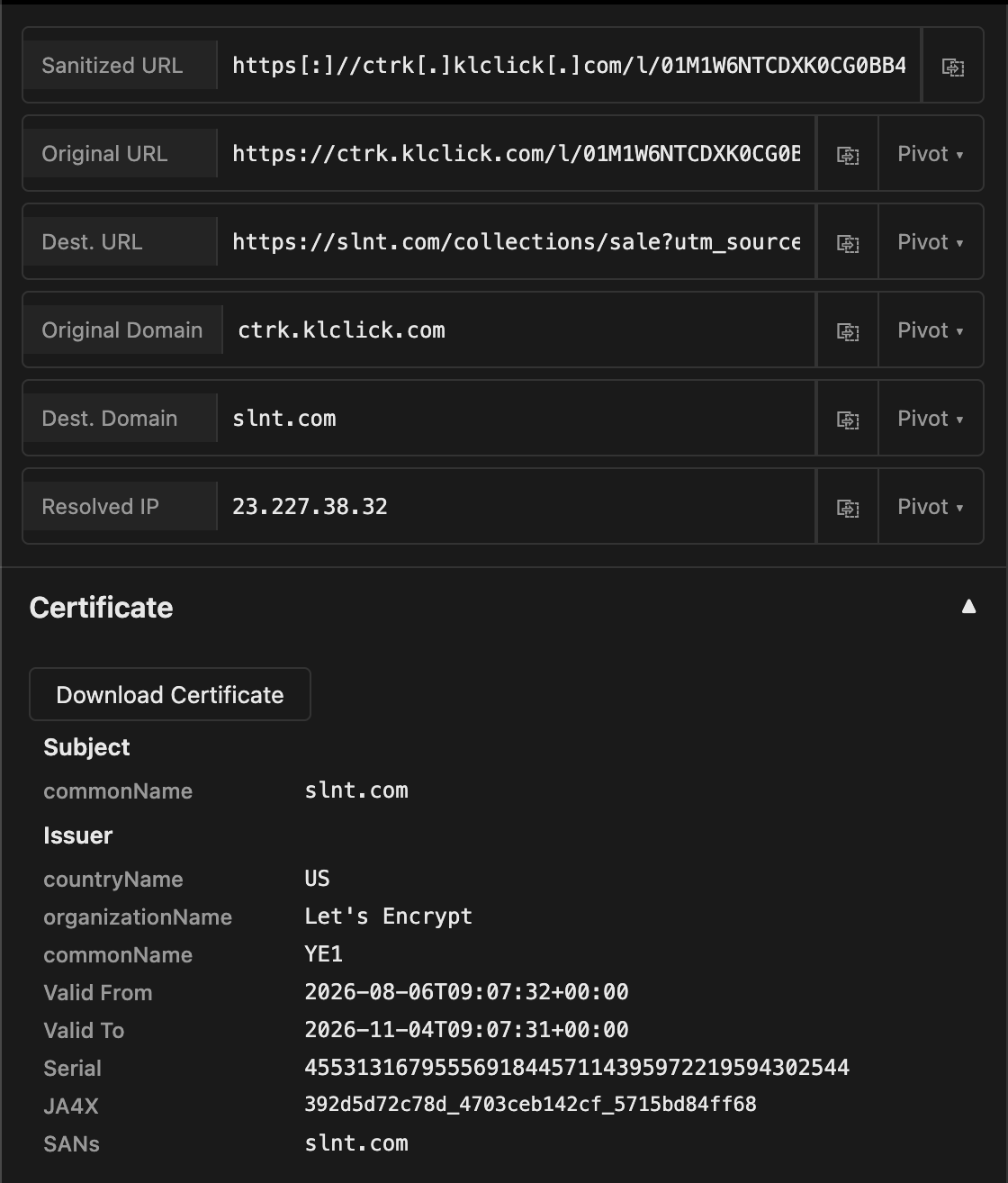
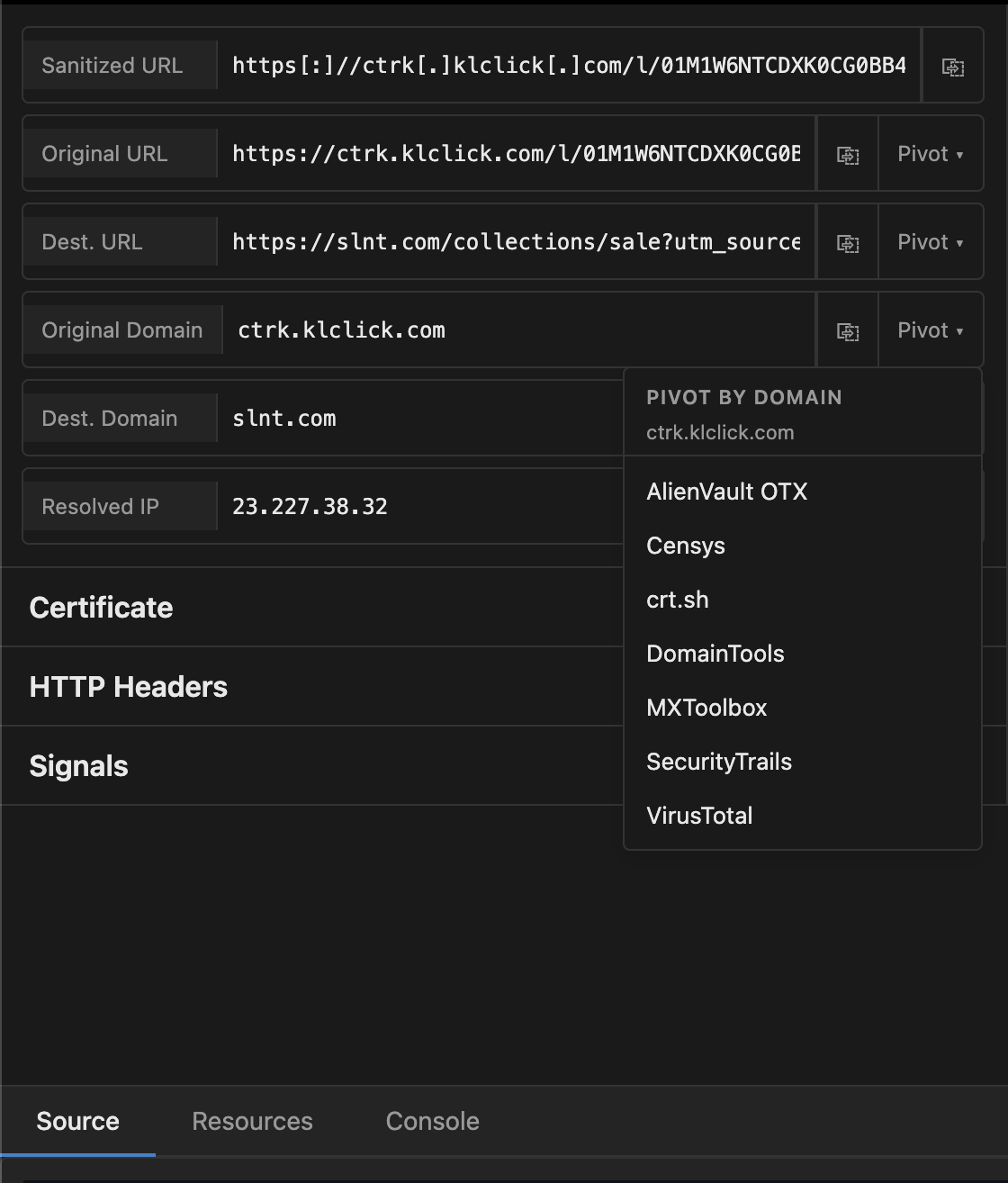
On the left, there are some fields pertaining to the link's location: its URL, domain, and IP address. Sanitized URL is the original link with some formatting applied in a process called "defanging," which prevents accidental clicks or browser navigation to potentially malicious links. It also makes it possible to safely share it in a readable format— helpful, perhaps, if you're writing an OSINT report, or alerting your IT department to suspicious links.
Destination URL displays the final URL the server arrived at after any redirects. This is the field you might be eager to check if you suspect the link is malicious or tracking you. Lastly, Resolved IP gives a starting point for the location of the server. The fields also have a "pivot" button, which lets you kick the link to other external investigative resources like MXToolbox, VirusTotal, AbuseIPDB, and many more. And if you have your own preferred resources, you can easily add them to the dropdowns, too. Just click Settings at the top of the page and input to your heart's content.
Reading between the headers
Below these fields are three collapsible sections: Certificate, HTTP Headers, and Signals. The Certificate section details whether the site has a TLS/SSL certificate and key aspects from it including the issuing Certificate Authority, validity dates, and Subject Alternative Names (SANs). There's even an option to download the raw certificate.
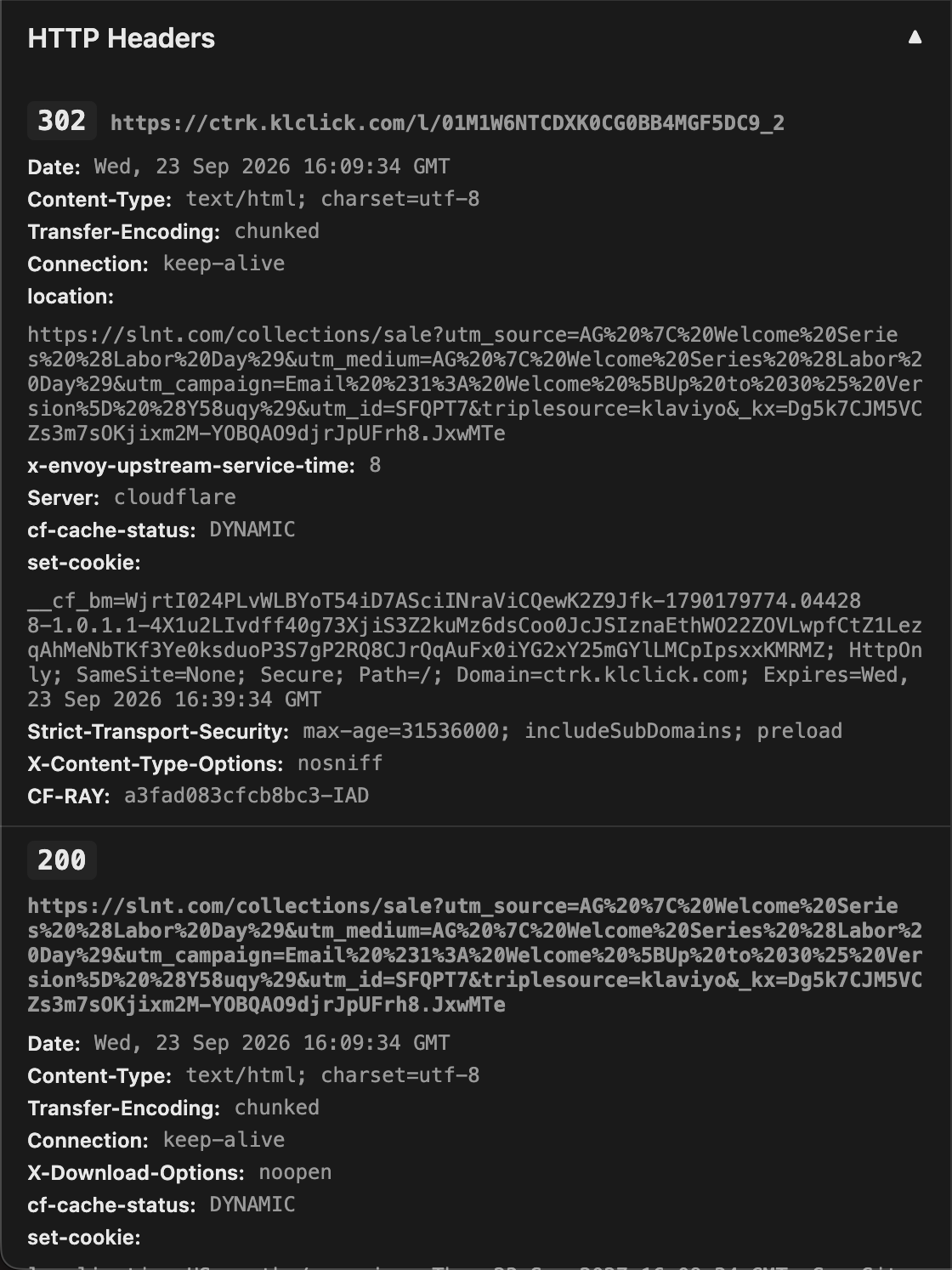
Next, HTTP Headers reveal the invisible communication happening between your browser and the server. Much of the information here is useful for debugging purposes, but it also reveals some information we might care about, like:
- which HTTP response status codes the server returns (like redirects or errors)
- whether the site is enforcing Strict Transport Security
- what cookies (if any) are set
- if the site allows itself to be embedded elsewhere (see below on iframes)
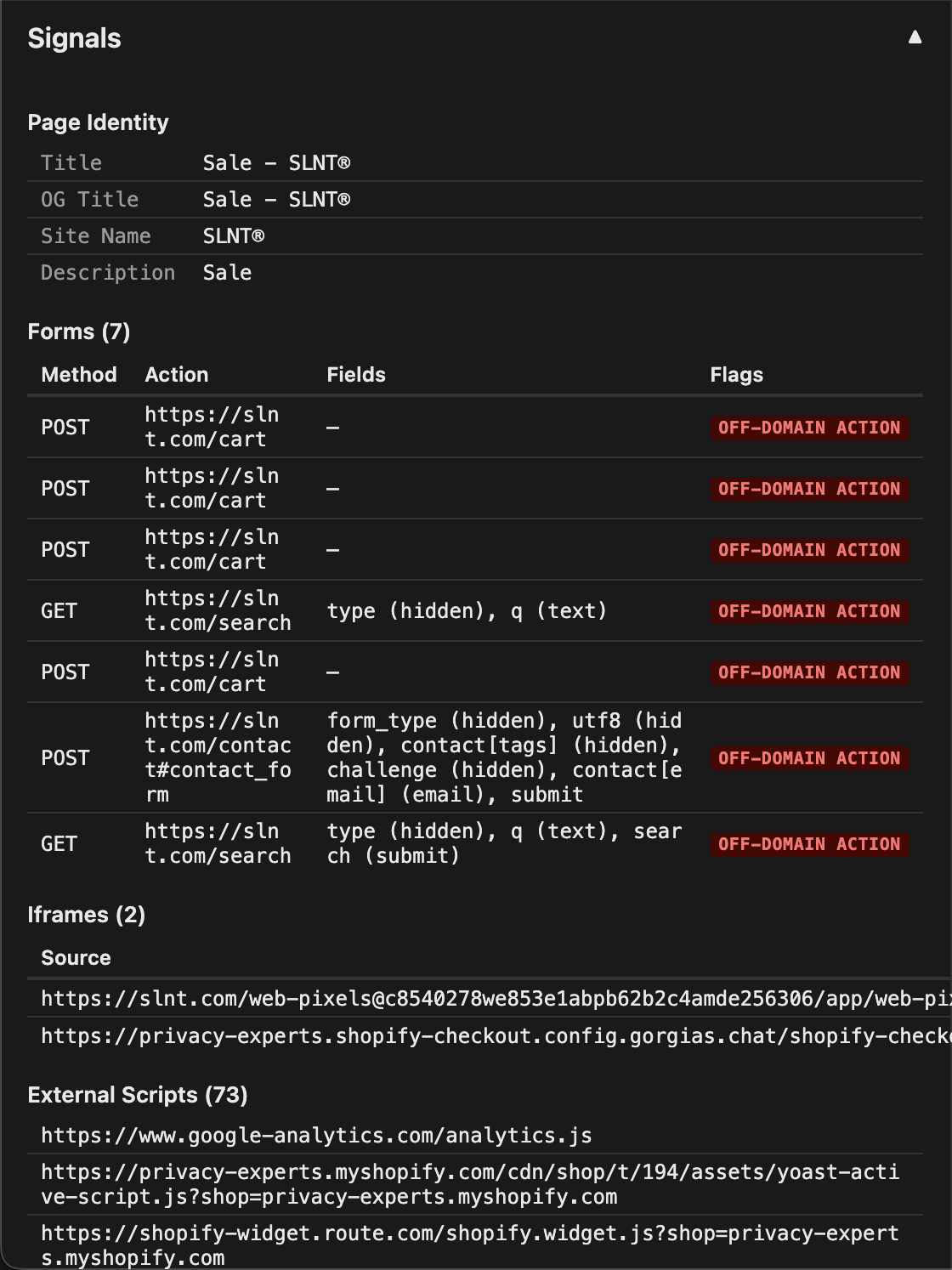
The last section is Signals, which detail some other activities happening behind the scenes. The volume of information presented will vary depending on what you feed RawHTTP. Let's review the results from the klclick.com link again.
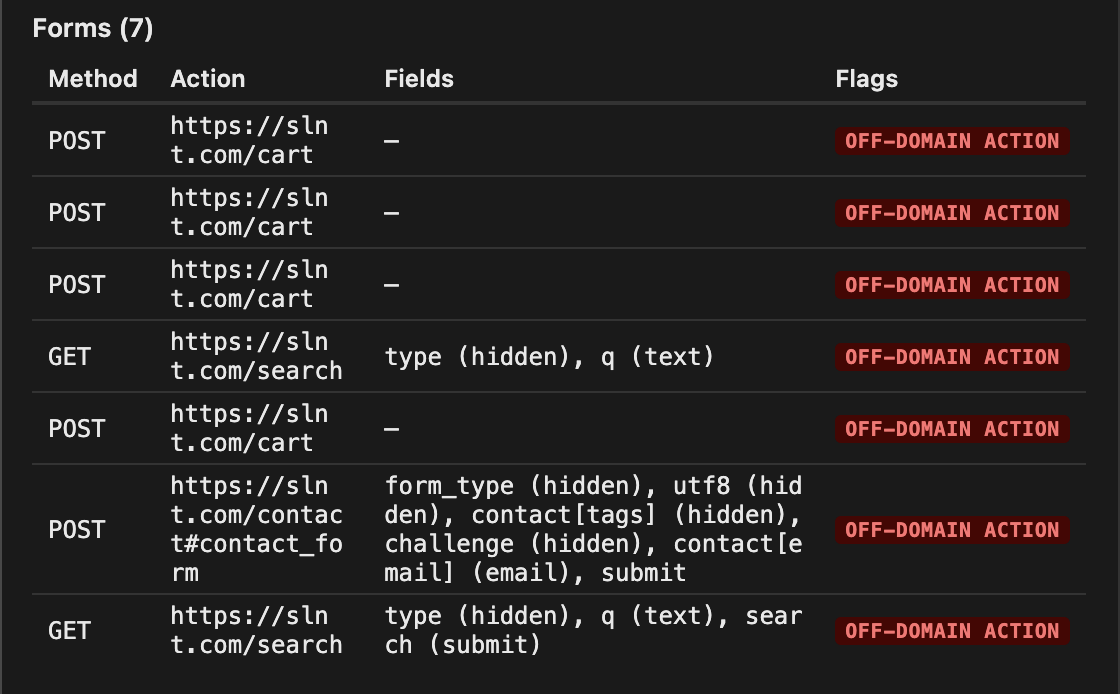
Forms display all the HTML forms (interactive elements like input fields, clickable buttons, etc., that collect and transmit data) are running on the page. The forms on this page are using GET and POST methods, the chief difference being GET fetches and returns data to the client (you), while POST sends data from the client to a server to create or modify an entry. Here, the requests are flagged as OFF-DOMAIN ACTION even though the Action field's URL matches the Destination Field. This is because those requests are happening immediately as the link loads, even though we are ultimately redirected to slnt.com.
Next, we find iframes, short for Inline Frames. These are elements which act as a "portal" to another webpage, and allow content there to be shown here. Good examples are X/Twitter posts embedded in news articles, a Google Map location on a restaurant's website, or Yellowball's episode player on our most recent podcast release. They are not inherently dangerous, but it's good to check for them in suspicious links because, using a little CSS, they can be turned invisible, which leaves the door open to potential attacks like clickjacking. Even some of the largest password managers, including Bitwarden, were vulnerable not too long ago. Iframes can also be a prime opportunity for yet more surveillance.
Case in point: notice two iframes are listed. One from slnt.com, and the other for Shopify. The first offers some interesting insight into SLNT's tracking if we dissect the link. First, let's make the link a bit easier to read by running it through a URL decoder first, which converts the ASCII characters into a readable format. It just so happens that RawHTTP has one such decoder built-in. Click Tools at the top of the page, then paste the link, and it does the rest. Now we're left with:
https://slnt.com/collections/sale?utm_source=AG | Welcome Series (Labor Day)&utm_medium=AG | Welcome Series (Labor Day)&utm_campaign=Email #1: Welcome [Up to 30% Version] (Y58uqy)&utm_id=SFQPT7&triplesource=klaviyo
&_kx=Dg5k7CJM5VCZs3m7sOKjixm2M-YOBQAO9djrJpUFrh8.JxwMTe
What do we find?
web-pixelsindicate (as we previously discovered) that SLNT is utilizing Klaviyo's tracking pixel technology. There are two mentions ofweb-pixelhere: the first is likely pulling the latest technology "engine" from Klaviyo, while the second is probably the specific instance or customer identifier allocated to SLNT, and identified by the string,2069135731@dbf16afd....- This page on Klaviyo's support lists "information about identified visitors" during an "Active on site" session, which helps us identify some of the UTM tags Klaviyo is using to track us.
utm_sourceandutm_mediumtell SLNT how we arrived on that page. Interestingly, both parameters are the same: AG | Welcome Series (Labor Day). This was likely a configuration choice by someone on the SLNT marketing team, asutm_mediumwould generally be something more specific like email, cpc, organic, etc.utm_campaigntells SLNT we engaged with the Labor Day email campaign. I find the use of the word "Version", parentheses, and brackets telling in that this is likely an iteration of some other, more generic Welcome campaign that is adapted on the fly for holidays or other major sale events.utm_idis the unique identifier for the ad campaign, which gives SLNT flexibility to change their naming conventions without losing specific data points.triplesource=klaviyois likely referring to Triple Whale, an ad attribution platform that marketers use to understand how their customers found, interacted, and ultimately purchased from them. In this case, it helps SLNT know that Klaviyo was the introductory point for us. Full disclosure, I used AI to help me solve this one. I can't find documentation elsewhere that specifically identifies "triplesource=" as a parameter. But, Triple Whale does have documentation about Klaviyo integration using a very similartw_sourceparameter. So, take this with a grain of salt... it may not be entirely accurate._kxis a unique identifier, generated by Klaviyo and assigned to us. Notice it is, in fact, the same identifier we saw earlier appended to the destination URL. While not a surprise, it is interesting to see some of the tracking we try to dodge appear in the wild so transparently. Here's a screenshot from their support site, detailing how it works.
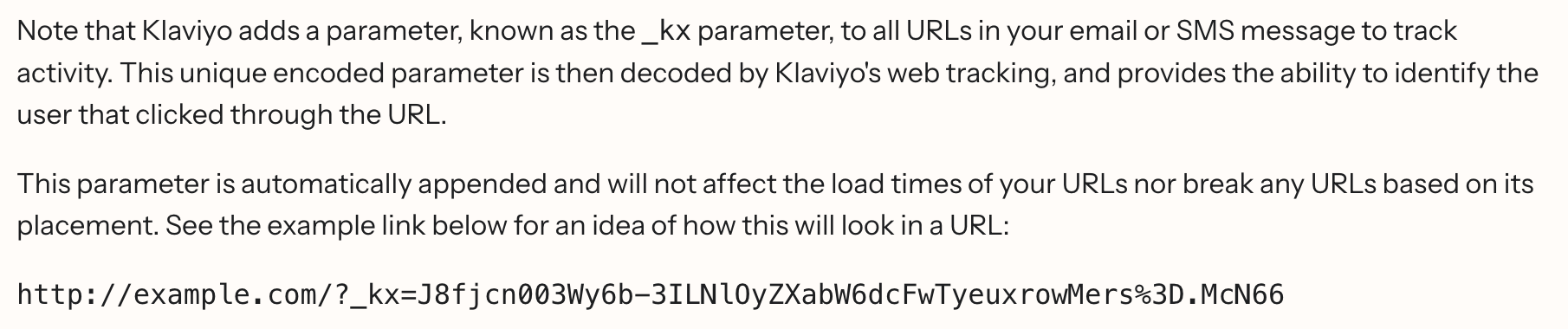
Okay, quick sidebar: remember earlier when I said the Destination Link still contained some tracking elements? Well, having just worked through some of the UTM tags in the iframe, we can see they are also present in the Destination Link, and all occur after slnt.com/collections/sale?. That question mark... marks... the beginning of a query string, which in our case is everything that follows. Query strings typically include key-value pairs which assign data values to data labels. Spoiler alert: these ones are unnecessary. Just strip the question mark and everything after out, and you'll arrive at the same page. In hindsight, entering an email for a discount was an elaborate ruse to capture data and track us, and we could have simply visited slnt.com/collections/sale. Now, in fairness, query strings and key-value pairs aren't exclusively used for advertising and tracking, and sometimes you can't strip them out of a URL without problems. But it's good to know that some tracking occurs this way, because now that you've seen it, you'll start noticing it everywhere.
The moral of the story is this: next time someone shares a link with you, check it for unnecessary query strings and remove them before clicking. Some browsers, such as Firefox and Brave, too, have a built-in feature called Copy Clean Link which attempts to do this automatically. I've noticed mixed results, though, and prefer to manually check my links, but using it is a good start. So, start experimenting. Next time you see a bunch of query string parameters, start removing them and see if the page still loads properly. You might be surprised how much you can strip out.
For this link, three more sections round out the Signals data: External Scripts, Off-domain Links, and Cookies. Check through these to get a sense of who else may be getting information about our interaction on this page (looks like Google Analytics, Google Tag Manager, Reddit, Shopify, and others), which links lead you off-site, and what cookies are being placed in your browser.
The link we analyzed was for an e-commerce page, but if you were to analyze the link to a photograph or PDF, say, then there's one more section of data you'd see: metadata. Here, try it out:
Dev Tools
The last section of the analysis page rests at the bottom, and it rips some common developer tools straight from the browser: Source, Resources, and Console. These load the same data points you would see if you were inspecting the site on your own machine.
Source is just that: the raw HTML source code of the visited page. You can do this yourself in Firefox-based browsers with Control / ⌘ + U, or Alt / ⌥ + Control / ⌘ + U on Chrome-based browsers.
Resources lists all the assets the webpage loaded to build the page: documents, media, HTML, CSS, JavaScript, and other files. RawHTTP lists the file type and the URL where each is located.
Console isn't interactive as it normally would be, but it does provide any log outputs which can be helpful in knowing what errors are occurring, what the site is doing over time, etc.
Extra Goodies
As if all this wasn't enough, RawHTTP manages to pack in a few more handy tools. Can you guess where they are? (Hint: remember the URL decoder?)
At the top of the page, click Tools. Inside the popup are two fields we can play with. The first allows us to paste text and, if it's a recognizable format, RawHTTP will encode or decode it into other formats, like:
- Plain text > MD5/SHA-1/SHA-256 hashes
- Plain text > Base64 encoding
- Detection of MD5, SHA-1, and SHA-256 hashes
- Encoded URI < > Decoded URI
- Defanged URI < > Refanged URI
- Base64 > binary with file-signature guess and download
- Base64 > plain text
The second field is a drop zone for images; you can add a QR code and RawHTTP will decode it. Alternatively, if you drop an image with text in it, the tool will attempt optical character recognition to extract text. The QR decoding, in my testing, seems reliable every time, but I have had mixed results with the text recognition.
What's truly remarkable about these last two tools, however, is that they are performed client-side with zero data transmission. There's a couple of ways we can quickly verify this claim, and both have worked for me. The easiest way is to simply turn off your device's network connection, then upload a QR or attempt to decode/encode text. Alternatively, you can open the developer options of your browser, navigate to the Network tab, and watch the results when you interact with the text field or drop an image. You will notice only GET requests are received from the server, and zero bytes of data in the Transferred column (if using a Firefox-based browser; Chrome-based works a bit differently, but yields the same outcome).
Go ahead, try it for yourself! (P.S., if you need a quick QR code, may I suggest Ente's new QR generator?)
Upcoming Features
I was graciously given beta access to pilot one of a few upcoming features in preparation for this post. The new feature is called Live Session. Unlike the existing features, this one is planned for a forthcoming subscription-only access.
As the name implies, Live Session extends the previewing experience beyond a simple screenshot of the site. Instead, it loads a live, interactive "browser" allowing you to see and navigate the loaded page as if you were doing it yourself. This comes with a few important caveats:
- Live Session is not a fully functional browser or virtual machine. It is a sandboxed preview of only the link. You cannot open additional tabs, navigate to another URL, right-click, access a desktop, etc.
- Downloads are automatically denied and popups are refused.
- The session lasts for a maximum of 60 seconds before terminating.
When the session terminates, we have some options. For one, a static Screenshot is generated and available for download, in addition to a video Recording of any activity performed on the site. There are also Frames— still images pulled from the video every ten seconds— and a text-based Timeline, which records various background events, like XHR and HTTP requests. You can download each of these elements individually, or choose to batch download everything as a .zip, or opt for a .HAR if you don't need the visual evidence.
The developer also said they are considering a feature which would allow users to proxy their searches through various locations, thereby obfuscating the traffic as coming from RawHTTP's server (more on that below).
RawPhish
If you've gotten this far, bravo. Let's wind down with something a bit less technical: RawPhish. It's the kid brother to RawHTTP, and it was designed for folks who would never read this post in a thousand years— grandma, your friends who refuse to use Signal, and John Podesta.
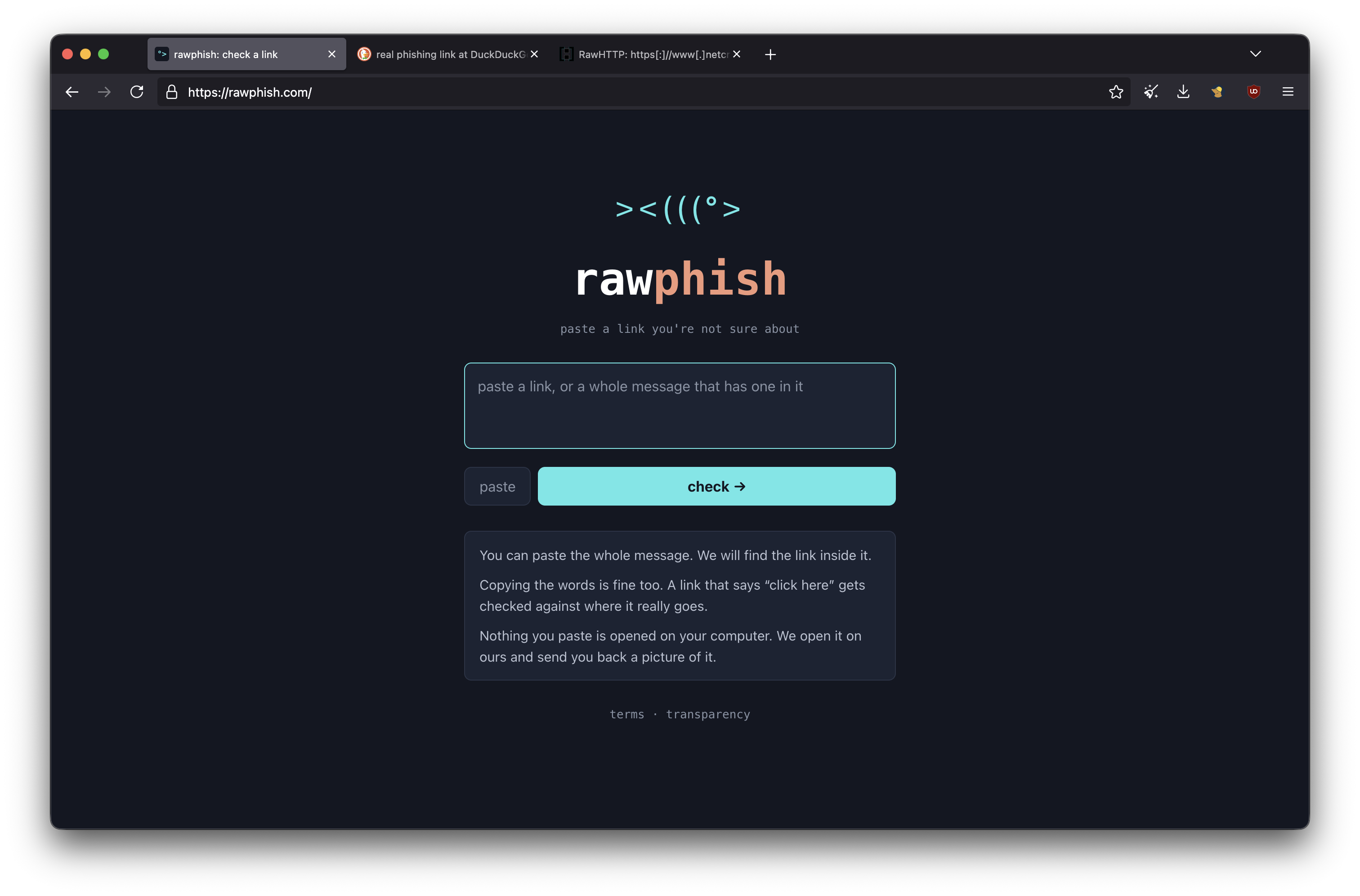
I find the little ASCII fish to be very charming.
The premise is just as simple before: paste in a suspicious link, and RawPhish will analyze it (using the same backend as RawHTTP). One way the developer has extended the accessibility of this tool to those less tech-literate is by making the paste box smarter. If, for instance, grandma gets an unexpected email from the IRS asking her to confirm her social security number, she needn't be savvy enough to extract the link from the button. She can simply copy and paste the whole email. RawPhish will find the link for her, or present options to choose from if there's more than one.
Then the tool springs to life with friendly animations and gentle coaching questions. It will alert her if the link shows one thing, but redirects to another... did she expect that? Does this screenshot look like the page she expected to see? Did she go looking for the site, or did it appear unexpectedly? Is the site asking her to disclose sensitive information, or download something, or act quickly? Based on the responses, RawPhish will advise whether the link is likely harmful or not, along with resources to help in the case of hacked accounts, identity theft, find and remove malware, and action plans after compromise.
Big fonts. Easy, color-coded alerts. Clear instructions. It's a great tool for those who need a second opinion on a suspicious link, without needing to have a higher technical understanding.
Developer Comments
Before I wrap this up for good, I wanted to share notes from RawHTTP's developer. I reached out to let them know I was writing up a review and had some clarifying questions before posting. Here's a summary of what they told me:
- The project was born "because I wanted to be able to see what websites looked like and the only existing solutions at the time were very slow and VM-based."
- RawHTTP (and Phish) is not currently open source, but it is something the developer is "open to doing at some point."
- Fathom Analytics are used only to record user count. No other analytics whatsoever.
- The servers processing URL requests are hosted by Amazon Web Services.
- Both tools are free to use, and the features available for free now will stay that way. Down the road, there are plans to launch certain features (like the aforementioned Live Session) behind a paywall since they are more resource intensive, and as a disincentive to malicious actors from taking advantage of a powerful tool.
- If you feel so inclined, donations are accepted in the form of Bitcoin or Dogecoin.
- Easter egg: If you click on What? at the top of the page, there is mention of RawHTTPcoin. See if you can figure it out. (hint: something I mentioned in this post may aid in deciphering it)
TL;DR
- RawHTTP is a free, proprietary, and privacy-respecting tool to check suspicious links. Use it to quickly "unshorten" a link, extract a destination URL, and preview the site. Or, make use of its powerful, automatic analysis to get a clearer sense of what's happening behind the scenes: redirects, forms, cookies, scripts, off-domain activity, tracking, malicious activity, and more.
- All searches are performed on a remote AWS server, and no logs are kept.
- Compiling some OSINT? Quickly pivot by URL, domain, or IP to popular security and threat intelligence tools, or your own preferred ones.
- Extra tools include string analysis and conversion for plain text, hashing, Base64 encoding/decoding, URI-encoding, and defanging/refanging IOCs. Drop in a QR code for fast decoding, or extract text from an image using OCR. All done client side, with nothing transmitted to servers (verifiable).
- A sister project, RawPhish, uses the same backend but presents the information in a concise, approachable manner, tailored for those who aren't as technically inclined.