App Share: Screen Time
My experience with a minimalist, screen time Android app.

Note: This post marks the beginning of a new blog series we're calling 'App Share'. Posts will feature an app we have been using along with our overall thoughts, what we like or think needs improvement, etc.
No time to spare, take me to the TL;DR!
I was recently talking to some friends who, like me, use GrapheneOS. One had just switched from stock Android and thought their battery life was shorter than their last phone. Curious, they wondered if we had noticed similar issues. After looking at their settings, we came to the conclusion that screen time was probably a factor in their battery performance.
While we were tinkering around in their settings, I was reminded that GrapheneOS doesn't have a particularly great way to view screen time. In shifting away from stock Android, an unfortunate casualty is the Digital Wellbeing feature. In Graphene, you can get a general sense of your screen time by navigating to Settings > Battery > Battery Usage, but the number here can be misleading as it only records the amount of time spent on the device since its last full charge. Not a very useful metric.
According to this source (and this one), the average person's screen time is approaching upwards of seven hours a day (or, in the case of South Africans, nearly ten hours). This source clocks in a bit less but still high, with half of American teens using their devices for more than four hours a day. Taken together, that's anywhere from over a full, 24-hour period to nearly three straight days of staring at a device, in just one week. Anecdotally, I see people staring at their phone during nearly any down time— at stop lights, in line at the cafe, in the waiting room for their doctor, at dinner with others, even during conversations with others— so these statistics don't surprise me, even if they are potentially high. No matter how you spin it, screen time is a problem.
If you are generally privacy-conscious, there's a good chance you have embraced some digital minimalism and reduced the number of apps you have installed, and the overall time you spend on your phone. But there are sneaky ways screen time can creep back in (like checking Redlib for too long when nature calls, which I definitely do not do...), so it's good practice to keep this concept in mind and check yourself once in a while.
All of this got me wondering what my screen time is. I assumed it is relatively low, but perhaps I was flattering myself. This brief introspective moment sent me looking for a FOSS app to find out, and soon I was testing Screen Time, by Markus Fisch.
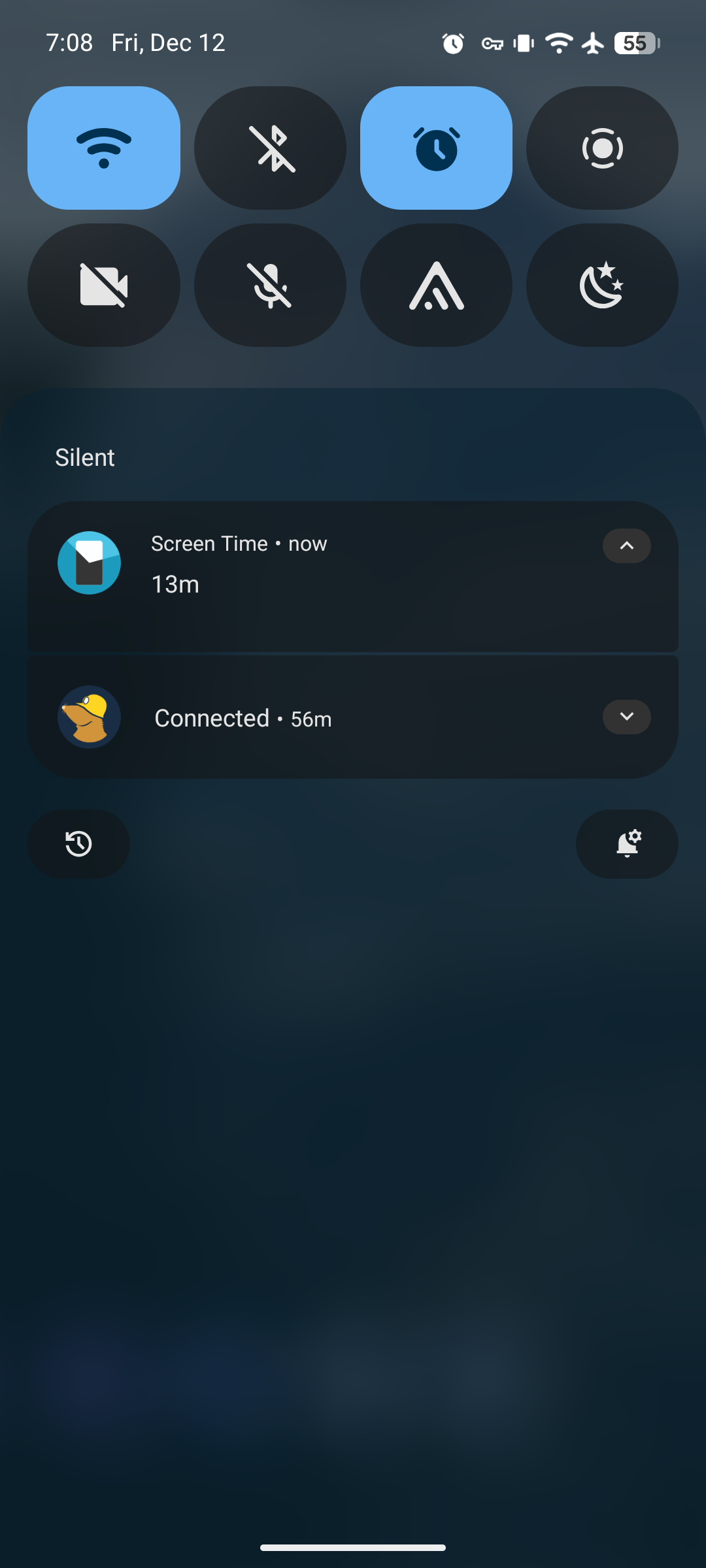
What initially caught my eye about the app is that it displays a permanent notification in the Quick Settings menu. I like this because it saves me the time of having to find and open the app (and thereby shaving a few seconds off my screen time, too). I use the Quick Settings menu often, and being able to see my screen time there is a convenient and efficient accountability measure.
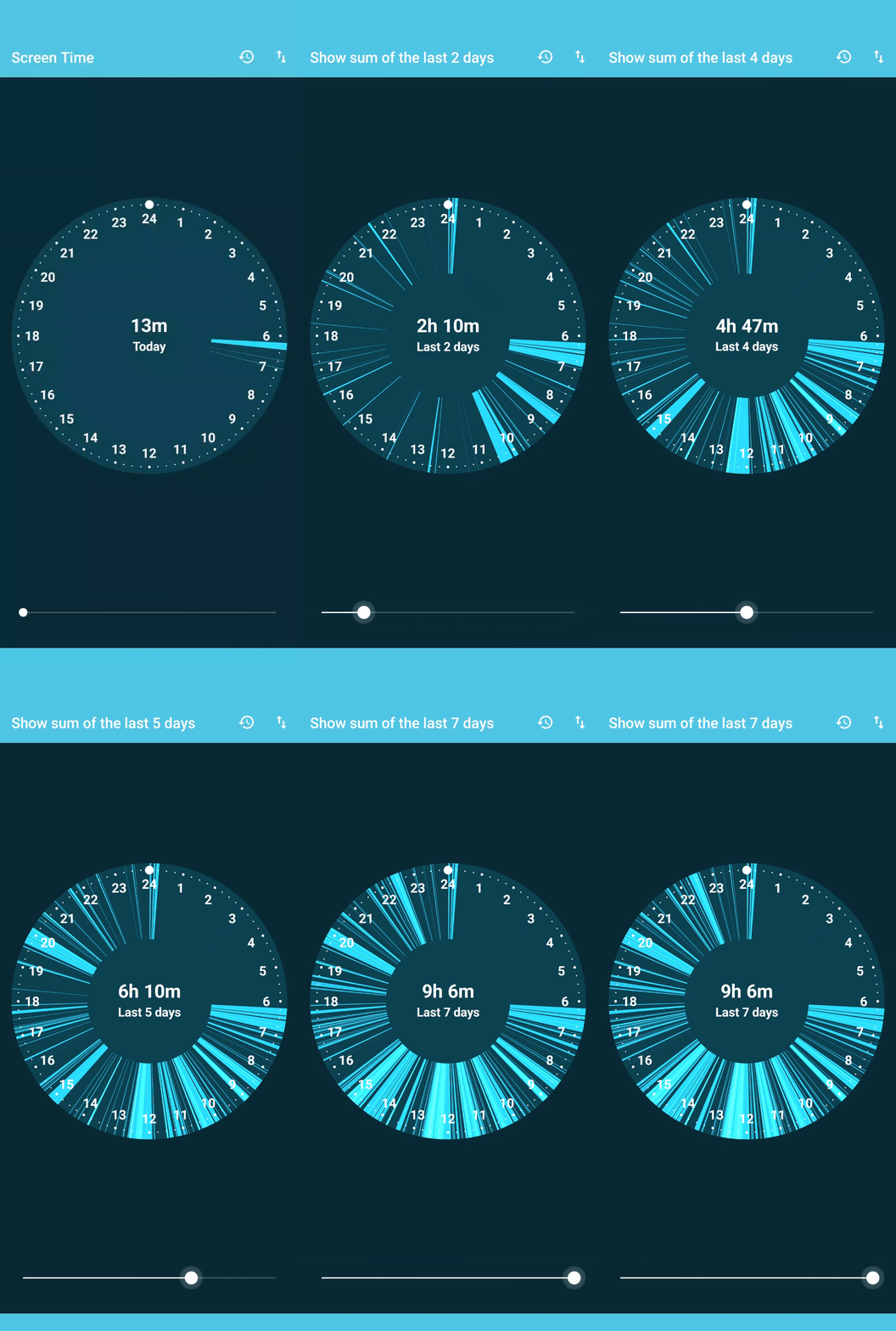
I also was attracted to the minimalist interface. The app focuses on simply tracking your total time spent looking at the device, and this metric is presented on the only two screens the app has. The first is a 24-hour clock, with blue "slices" denoting when you were looking at the device within the last day. You can optionally change when your day "starts", if 12AM is not your preference. The bottom of this page also includes a slider which displays your cumulative time over a given period.
The second page is a 'Detailed listing', which presents historical information in a graph. Here you can get a sense of your trends from the present up to three months ago. Each horizontal row represents a day, segmented into hour intervals within six hour sections. More blue lines indicate when within each hour interval you were looking at your device, and a green dot indicates the total amount of screen time for that day. As the app tracks your usage, this Detailed listing view is a handy way to understand your personal trends.
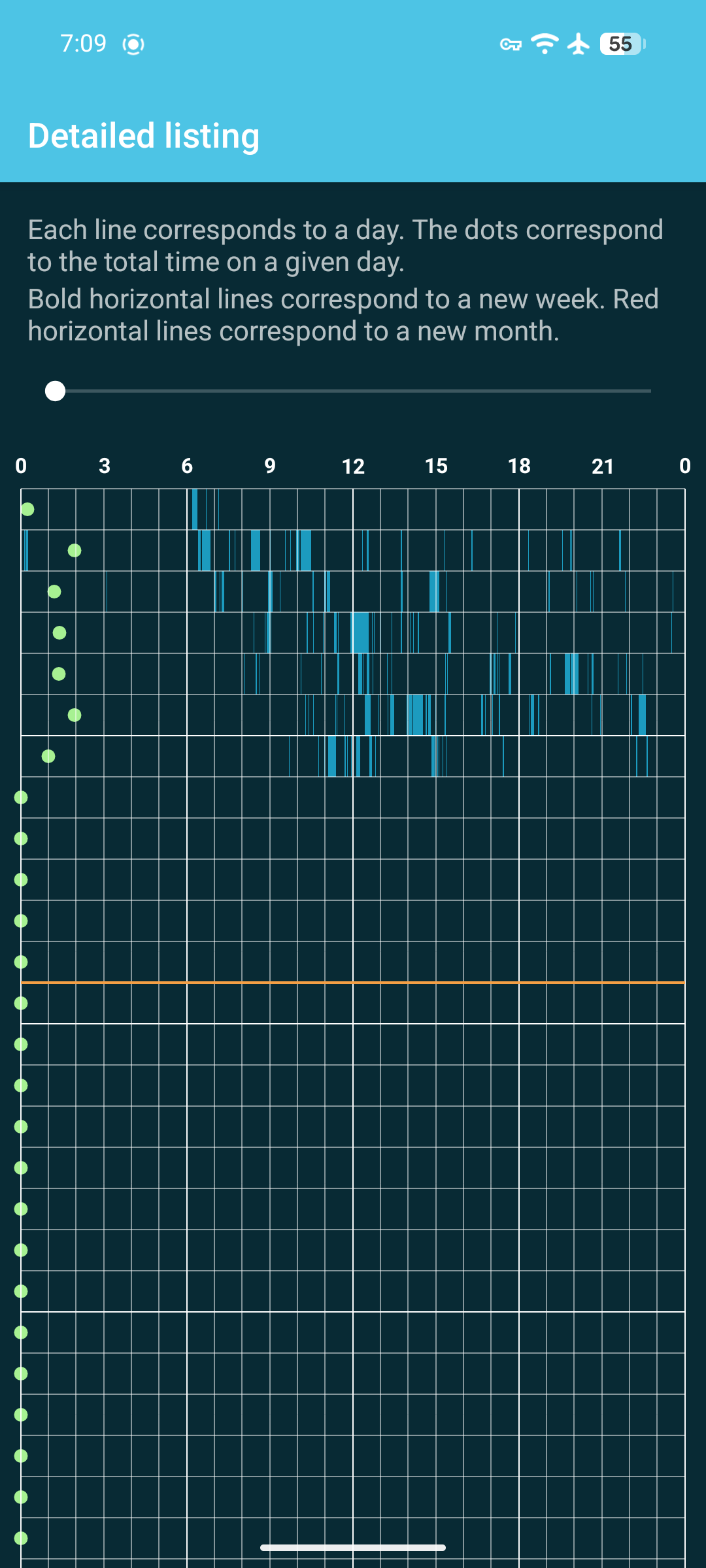
There is one feature on this page that feels a bit unfinished to me. At the top of the page is a slider which lengthens the duration of recorded events so you can better see even the briefest records. This has the effect of stretching all records out, so a three-hour screen time for a day may appear like 21 if you stretch far enough. My only nitpick is that I wish the time intervals at the top of the graph would also lengthen proportionately a you slide.
Something else I appreciate is that the app calculates screen time based on ACTION_SCREEN_ON and ACTION_SCREEN_OFF events. In theory, there may be some events that trigger your device into an "interactive" state while the display is off, but in practice, I have not found this to be the case (at least so far). In my testing, if the display was off, the timer wouldn't count. I listened to our most recent podcast episode with the phone in my pocket, and later had a ten minute call on Signal, both with the display off. When I checked my count, it had only incremented a minute more, likely accounting for the time it took to navigate to our episode, and find and call my contact. In the past, I have found other screen time apps and settings count these kinds of activity, which has always confused and frustrated me. If I'm not looking at my screen, why should those activities be counted as if I am?
Lastly, the app is lightweight. With the exception of notifications, the app does not request any permissions. It just works. And it's gentle on battery, too. Even with the background usage set to "Unrestricted" (optional), it only consumed a minimal amount of battery and had a negligible impact on my day-to-day use.
Notably, this app lacks some features with which you may be familiar. For instance, it does not offer advanced statistics, like a breakdown of time spent per app or website. Nor does it provide content or access limits, such as the ability to embargo an app after a maximum amount of time, or during a certain time of day. However, this is precisely what I like most about the app. Why?
I have configured my device to be rather stripped down. I have only essential apps to communicate, keep my web traffic private, take notes, and some others for basic productivity. No games, no banks, no shopping, no video apps. AntennaPod is probably the "guiltiest pleasure" I have installed. Because my device is configured this way, I don't really care on which apps I'm spending the most time— just that I minimize the time on the phone generally.
Screen Time is a refreshing take on the classic metric measuring app. It's barebones. Its goal is only to measure your total time looking at the device "without judgement", as the developer puts it. "Just so you know". If you're looking for a minimalist screen time app, I recommend this one. (And, if you end up enjoying it, consider making a contribution to Markus for his time and effort.)
In the end, I learned my screen time was lower than the average, but still higher than I estimated. And what else? When nature calls, the phone does not.
TL;DR
- Screen Time, by Markus Fisch, is a minimalist, free and open-source Android app.
- The app records the total time you spend looking at the device, and puts a permanent notification in the Quick Settings menu for easy access.
- Two view modes let you quickly assess when you spend time on the device, on a daily or weekly view.
- Usage by app or website is not tracked, just your cumulative time. The app does not provide access controls or other limits.
- Only notification permissions are requested, and the app is battery-friendly.
- If you want advanced time reports, or the ability to restrict app usage, this is not the app for you. If you don't care about those things and just want to know how long you've been looking at your phone, you might like this app.